|
|
|
|
Editorial PolicyCan I can change the keywords after the submission?
No, keywords cannot be changed after a paper's submission, because they are the crucial element in deciding who the editor in charge will be, and therefore how the peer review process is determined. Apart from selecting the keywords, at submission time authors can also assign a value to each of them (25, 50, 75 or 100) to establish their relevance to the subject matter covered in the preprint.
I have prepared a new version after the submission. Can I upload it?
No Once submitted the article should not be replaced, if the new version differs substantially the article can be withdrawn and resubmitted.
Who is the corresponding author in JINST?
The person making the submission, who is notified of decisions and requested to take action in the various steps of the editorial process. If the paper is accepted for publication the corresponding author will be asked to accept a copyright form online, on behalf of themselves and their coauthors. By accepting the copyright form, it is assumed that all authors have received the final version of the contribution, have agreed to it being submitted to the journal and agree to the terms of the copyright form. Please note: on the publisher's page the corresponding author will be the first name listed in the .pdf of the article.
Can I add coauthors after the article has been submitted?
Yes. The corresponding author of articles submitted to JINST is responsible for the accuracy of information in regards to coauthors. If coauthors are added/removed after submission they and the editorial office should be informed accordingly.
Who is the editor handling my article? Why do editors remain anonymous?
The Editorial Board is composed of distinguished and active scientists in the field. Editors in JHEP are selected automatically through an algorithm based on the keywords selected by the authors at submission time. After the paper is assigned to an editor, the editor usually seeks the advice of an expert reviewer, but may equally well decide to review the paper autonomously. Editors and referees generally operate anonymously in order to guarantee an unbiased handling of articles, but are free to reveal their identity to the authors if they so wish.
Can I suggest referees for my paper?
Yes, upon submission you can use the 'write to editor' button to suggest suitable referees for your article, however the editor in charge of the article is under no obligation to select them.
The refereeing on my paper is taking longer than expected. What can I do?
The editor in charge and the editorial Office are carefully following the processing of your paper and will do their best in order to avoid any undue delay, while favoring quality over speed. It can be a a challenge to ensure timely responses, and it can happen that the process takes longer than planned. You can at any time get in touch with the editor in charge to inquire about the status ('write to editor' button on the preprint status page).
Why am I asked to convert my paper in a technical report?
In some instances referees/editors may find that manuscripts submitted as regular articles are more suited to the category of technical reports. In such cases, the editor will inform the author that his/her article is not suited for publication as a regular paper (stating the reasons) and will offer him/her the possibility for it to be considered for publication as a technical report.
Can I add coauthors after the article has been published?
No, changes of authorship or in the order of authors listed will not be accepted by the publisher. The only way to modify the author list of a published article is by means of an erratum.
What if I need to make corrections, or additions after the article has been published?
The only way to modify a published paper is by means of an erratum\addendum. https://jinst.sissa.it/jinst/help/helpLoader.jsp?pgType=author#erratum
Can I submit an article accepted for publication to arXiv?
Yes. JINST encourages authors to submit to arXiv their article accepted for publication including all changes made as a result of the peer review process, but excluding any other editing, typesetting or other changes made by IOP Publishing and/or its licensors. Please select the 'non-exclusive licence to distribute' offered by arXiv when uploading the article. We recommend the inclusion of the DOI when citing the published manuscript.
What can I do if my paper is rejected?
Authors can request to appeal a rejection decision. Appeals must be scientifically justified and not polemic. Appeals can be assigned to the same editor or a new one on a case by case basis. Second appeals will not be considered unless there is a clear history of unfair treatment of the manuscript. Appeals should be requested within a year's time, after which articles will be considered as new submissions. To guarantee the fair treatment of papers, the processing of appeals is supervised by the scientific director.
What can I do if my article receives a 'not suitable' decision?
Not suitable decisions cannot be appealed. This kind of decision in fact indicates that the paper does not fall within the scope of the Journal and cannot be considered for publication, either because the subject matter is not relevant for it, or because it does not meet its standards.
What is the Journal’s policy on data files and similar supplementary material?
JINST strongly encourages posting data files and similar supplementary material to publicly-accessible, discipline-specific, community-recognised repositories that comply with the FAIR principles as much as possible.
In cases where a suitable discipline-specific resource does not exist, such files may be submitted to a generalist repository (for example, Zenodo), including any such repositories provided by universities, funders or institutions for their affiliated researchers. Authors may also wish to explore repository registries such as FAIRsharing.org and re3data.org
Supplementary material should conform to the FAIR principles as much as possible. Latex F.A.Q.How do I include the bibliography in my document?
How do I include figures in my Latex document?Use graphicx: include the graphicx package
(
NB: File names are case sensitive and must not contain spaces How do I include line numbers in my document?You can use the lineno package which provides line-numbering and various options for customization as shown in the following example.
How do I include .jpg, .pdf or .png figures in my Latex document?You can use graphicx (include the graphicx package at the start of the latex file)
but you must also add \pdfoutput=1
immediately after the
Important note: the JINST.cls preloads by default the graphicx package, therefore if you use the JINST.cls, the \pdfoutput=1 statement must appear on the line preceeding the \documentclass statement as shown.
NB: Figure file names are case sensitive and must not contain spaces. Are there problems with high resolution images?If the figure file size is very large, the generation of the pdf will take longer than normal which may result in a system timeout and generate an empty .pdf file (see "A blank pdf file has been generated"). The use of very high resolution figures may affect the size of the final .pdf file, increase the download time of your article and increase the time needed to visualize the page containing a very high resolution figure. Figures can be used to improve your article, and their readability is very important. Readability does not imply high resolution, so a tradeoff should be made in order not to create an unnecessarily large .pdf file. Does your system have any particular Latex requirements?
Yes
1. The \documentclass command and all its options must be typed on a single line. 2. If you use pdftex you must add
\pdfoutput=1 immediately after the
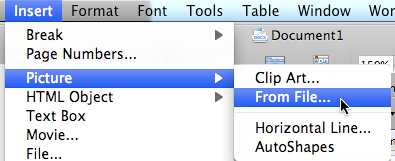
3. File names must not contain spaces and are case sensitive 4. If you use Bibtex the bib file must be included in the submitted archive Word F.A.Q.How do I include figures in my Word document?To include figures in your Word document, choose the "From file..." option, from the "Insert, Picture" menu:
Figures should be referenced in the text and always need a caption describing their contents. All the figures must also be included as separate files (.png, .jpeg, .pdf) in the compressed archive. Are there problems with high resolution images?If the figure file size is very large, the generation of the pdf will take longer than normal which may result in a system timeout and generate an empty .pdf file (see "A blank pdf file has been generated"). The use of very high resolution figures may affect the size of the final .pdf file, increase the download time of your article and increase the time needed to visualize the page containing a very high resolution figure. Figures can be used to improve your article, and their readability is very important. Readability does not imply high resolution, so a tradeoff should be made in order not to create an unnecessarily large .pdf file. Archive preparation F.A.Q.When do I need to create an archive file for submission? (.tar.gz or .zip)If your submission contains more than 1 file, you need to submit a tar.gz or zip archive containing all the necessary files for a successful compilation (see "What files do I need in my archive") How do I create an archive file for submission? (.tar.gz or .zip)First locate the folder ('mypaper' in our example) that contains all the files that need to be compressed. Linux/MAC tar.gz: Linux/MAC zip: Windows/MAC zip: What files do I need in my archive?Master
file: If two or more source files have the same extension (i.e. "main.tex" and "definition.tex", or "File1.docx" and "File2.docx"), when submitting your article you must specify the master file name in the appropriate field (Master file name:), otherwise the submission will fail. All figure files: Other files: Do not include: the pdf of your article, unused figures or any other unnecessary files (such as referee report ecc). Supplementary material can be uploaded separately after the archive upload (see "Supplementary material attached" in the JINST author pages), Important notes on file names: Is there a size limitation for my archive?
Yes. The maximum archive file size that is accepted for upload is 10MB
Submission FAQHow should I prepare my submission if it includes more than one file?
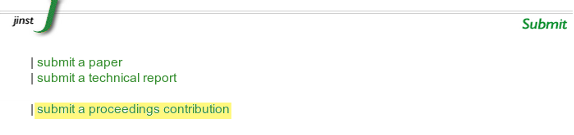
Please note that large tables, additional figures, computer programs, output files or video clips can be submitted as additional material, by clicking on the button "upload file" after the successful submission of the article (see "Supplementary material attached" in the JINST author pages). See also the section "What files do I need in my archive" and "How do I create an archive file". Can a file name contain spaces?No. Please enusure that all file names do not contain spaces Remember that if you change the name of the files included/referred in your Latex article (figures' name, bibliography file,...), then the main .tex file has to be updated accordingly. Are file names case sensitive?Yes. If File1.eps is refered to in the Latex article, the system expects to find File1.eps and not file1.eps Remember that if you change the name of the files included/referred in your Latex article (figures' name, bibliography file,...), then the main .tex file has to be updated accordingly. What type of files can I submit?.tex Other file types are not accepted. How do I submit an article for a proceeding?Click "Submit a proceedings contribution" from the JINST home page, choose the conference, and then follow the "Submission" instructions
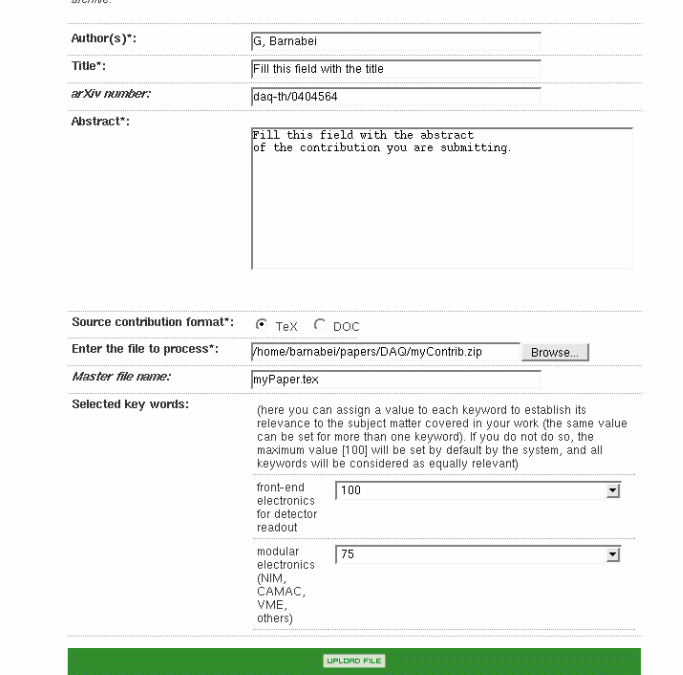
How do I submit an article for a review?Please note that only invited reviews can be submitted to JINST. Click "Submit a review" from the JINST home page, choose the review, and then follow the "Submission" instructions How do I submit an article for a special issue?Click "Submit a special issue" from the JINST home page, choose the special issue, and then follow the "Submission" instructions How do I submit a Word document?Please refer to "File and archive preparation" and then follow the "Submission" instructions. Submission via web upload: what information is required?The figure below provides an example of a correctly compiled submission form. The field "arXiv number" is not mandatory and your submission will not fail if you do not fill it. The master file name must be provided when more than one .tex or .docx file is present in the submitted archive. If it is not provided you will recieve the following error:
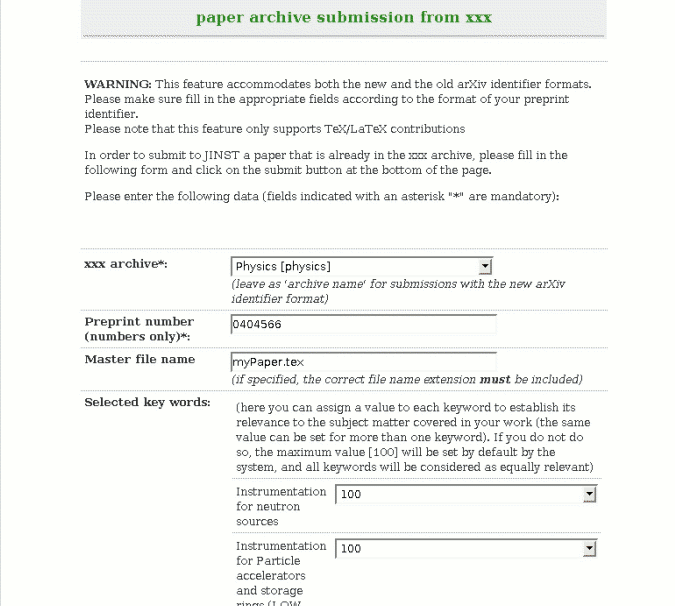
Submission from the arXiv: what information is required?The figure below provides an example of a correctly compiled form.
The master file name must be provided when more than one .tex or .docx file is present in the submitted archive. If it is not provided you will recieve the following error:
What kind of license should I choose when submitting to arXiv prior to submitting to JINST?
For questions about license and copyright please write to: permissions@iop.org
What checks are performed during submission?There are 6 checks for a successful submission:
If you have a submission error in one of these steps, consult the section "The submission cannot be accepted by the system". Remember that the submission can be completed only if your file compiles successfully on the JINST server. Therefore, please check the pdf generated by the system. What does the "The system is unable to find the master file" error mean?It means that the system can not locate the master file inside the submission archive, and it is probably placed inside a sub-directory of the archive. The master file (.tex or .docx) must be placed in the root directory of the archive. See "How do I create an archive file" for more information. Submission errors after clicking "upload file"Invalid parameter<Invalid parameter "authors">
"authors" is a mandatory field and must be filled in.
<Invalid parameter "title">
"title" is a mandatory field and must be filled in.
<Invalid parameter "abstract">
"abstract" is a mandatory field and must be filled in.
<Invalid parameter "contribution file"> This error message is displayed in one of the following cases:
<Invalid parameter "source contribution format"> You must select a format for the contribution (.tex or .docx). <Invalid parameter "arXiv name"> When submitting a preprint with the old arXiv number format, you must select the appropriate archive name from the "xxx archive" pull-down menu. <Invalid parameter "preprint number"> This error appears if an empty string has been entered or if it does not comply with the arXiv preprint number format (both the old format and new format are accepted). An error has occurred while connecting to the archiveERROR loading the submitted contribution: Either there is a network error or the site http://arxiv.org is not responding. Please try again later or use the web upload submission mode. "ERROR loading the submitted contribution: The system was unable to download the file because it could not be found. There can be several reasons for this, including:
The submission "cannot be accepted by the system"
An error has occurred in one of the 6 steps of the upload process :
Submission failure: submitted file size is greater than limitThe size of the submitted file exceeds the system limit of 10 MB. Try to reduce the size of the archive file you are submitting see "What files do I need in my archive?" and repeat the submission including only the files that are strictly necessary your archive. If the submitted archive or file includes a video or other files that can be viewed separately from the contribution, these can be submitted as separate attachments after contribution has been uploaded successfully. Submission failure: empty file received
The submitted file is empty. Please check the submitted archive file
or try to recreate the archive file
(see "How do I create an archive file"). System error after clicking "upload file"A system error has occuredThe main cause of this type of error is that the bibliography is not included correctly in your Latex article. See the section "How to include the bibliography" for more information. Successful submission but there are some problems"There is no format available yet" is displayed in the preprint pageAn error occurred whilst generating pdf file. Our technical staff have been informed automatically of the problem and it will be resolved as soon as possible. The author and the editor will be informed by the Editorial Office as soon as the files are available. A blank .pdf file has been generatedAn error occured during the pdf generation. Please inform the Editorial Office of the problem. This problem is mainly caused by a timeout due to large images in the article. If this is the case, please use smaller sized images in future submissions. The .pdf file is not completeThis is usually due to a problem with a figure file (e.g. the figure is corrupted or has a technical problem). Please inform the Editorial Office of the problem. If this is the case, in future submissions, please check integrity of your figures before submission. Figures are missing from the .pdf filePlease inform the Editorial Office of the problem.
Figures are misplaced in the .pdf fileAll figures should be cited in the text, therefore the misplacement should not affect the content of the article. Please inform the Editorial Office if the problem affects the readability of your article. The references are missing from my .pdf filePlease inform the Editorial Office For future submission please check that:
Common errorsThe most common errors relate to figures, bibliography and file names:
The masterfile is not placed in the root directory of the archiveThe master file (.tex or .docx) must be placed in the root directory of the archive. Your Latex article includes .png .jpg or .pdf figuresIf your Latex article uses .png, .jpg or .pdf figures, then a Pdflatex compilation is required. You must add \pdfoutput=1 on a separate
line immediately after the
Important note: the JINST.cls preloads by default the graphicx package, therefore if you use the JINST.cls, the \pdfoutput=1 statement must appear on the line preceeding the \documentclass statement as shown.
Remember that ps and eps images are not allowed in pdflatex. Some files are missing in the archiveSee the section "What files do I need in my archive". Latex compilation errors regarding figuresLatex compilation errors regarding figures are very frequent. The most common reasons are:
Latex compilation errors regarding the bibliographyIf the system can not locate the bibliography file, it will generate an error. The most common reasons are:
Latex compilation errors regarding file namesThe most common errors are:
Latex compilation errors regarding the command \documentclassThe \documentclass command and all its options must be typed on one line. The following will produce an error:
The following is correct:
|
||||||||||||||||||||||||||||||||||||||||||||||||||||||||||||||||||||||||||||||||||||||||||||||||